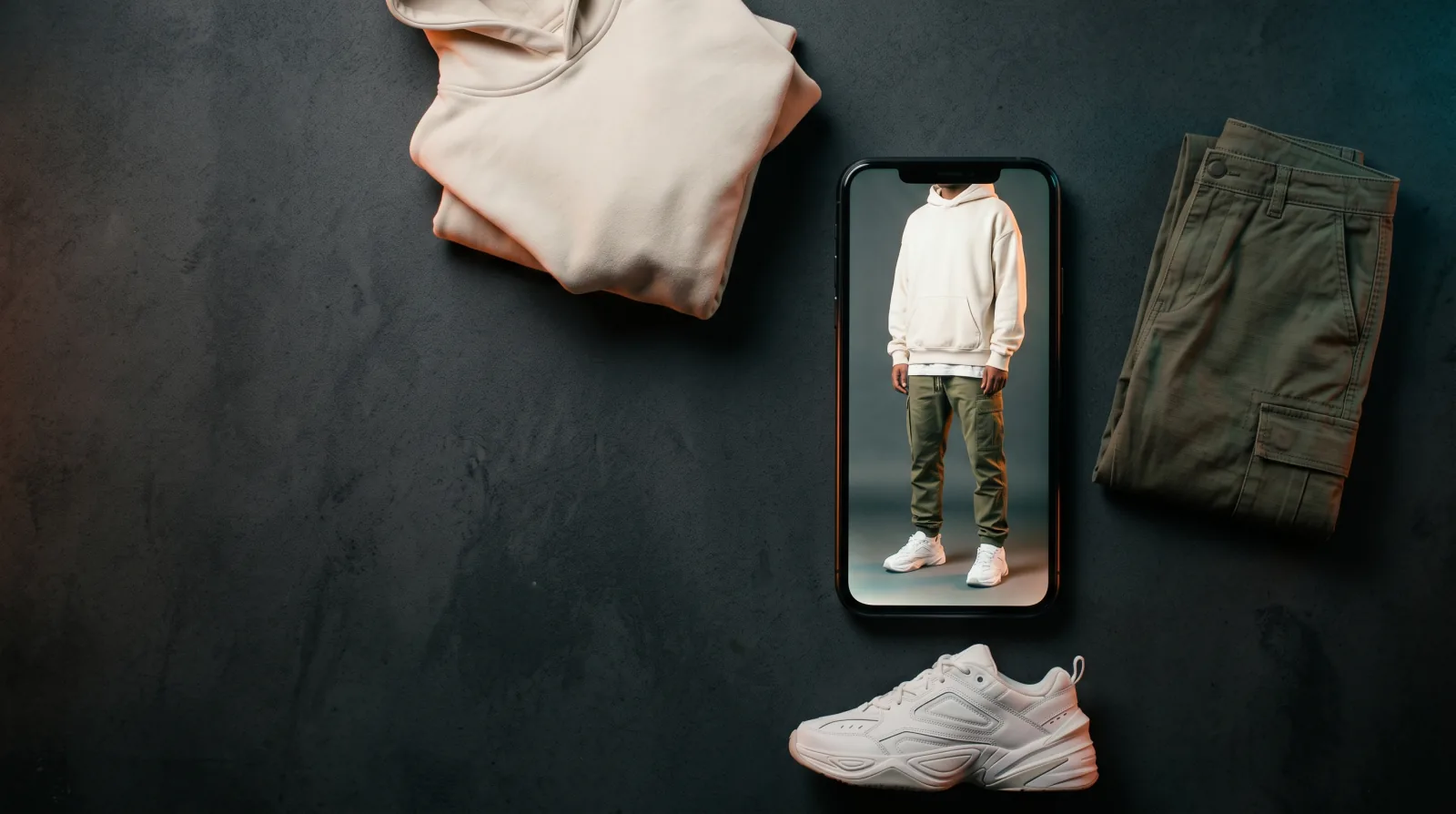
You screenshotted the outfit.
Here is where to buy it.
Upload it and Snagfit names every piece in the photo, then finds each one on sale. The exact item when it is still listed, the closest thing when it is not.
99¢ a screenshot. No account needed, no app, and your photo is never posted anywhere.
Why is finding the clothes harder than taking the screenshot?
You saw the outfit, you paused the video, you took the screenshot. It is sitting in your camera roll with a few hundred others. And then the part that should be simple turns into work.
You try typing what you saw into a search box, and you find out how hard it is to describe a jacket in words. Was that sage or olive? Is the collar a funnel neck or a stand collar? You get pages of results that are nearly right. You try a reverse image search, and it shows you other places the same picture was posted, which is not the same question as what the person is wearing. You ask in the comments, and if you are lucky someone answers in three days.
Meanwhile the outfit is four separate things. The hoodie, the trousers, the shoes, the bag. Each one is its own search. Most people give up somewhere around the second one.
How to find an outfit from a screenshot
What do you get back?
- Every piece, not just the obvious one. Snagfit returns up to eight items from one photo and puts the most prominent first, so the bag and the shoes come back alongside the jacket you were actually looking at.
- No search terms to invent. You never have to work out whether to call it sage or olive. The AI writes the description, and that description is what gets searched.
- Options at more than one price. Each piece comes back with alternatives, so a sold-out original or a price you did not expect is not the end of it.
- You buy from the shop itself. Tapping through opens that retailer's own page at that retailer's own price. Snagfit does not take your payment and does not add anything to the price.
Takes a few seconds. Nothing to install.
What does one screenshot actually return?
Take the photo at the top of this page as the example: one person, one full-body frame, four things worth finding. Here is what Snagfit does with it, step by step.
The vision model looks at the picture and separates it into garments rather than treating it as one image. It writes each one down the way a person would describe it to a shop assistant. The cream oversized hoodie becomes something close to "cream oversized cotton hoodie with a kangaroo pocket". The trousers become "olive green cotton cargo trousers with side pockets". The shoes become "white chunky leather trainers". Four garments, four short descriptions of roughly four to eight words each.
Each of those descriptions then runs as its own search against listings that are on sale right now. That is the step that decides your results, and it is worth being clear about what it means. Snagfit is not looking for the pixels in your screenshot. It is looking for clothes that match the written description of what it saw. So the cream hoodie search returns cream oversized hoodies from whichever shops currently list one, sorted by how well each listing matches the description.
The practical consequence: the more distinctive a garment is, the closer the match gets. A plain white t-shirt returns a lot of results that all look the same, because one plain white t-shirt really is hard to tell apart from another. A jacket with an unusual collar and a specific colour gives the search much more to work with. Neither outcome is a bug, and knowing which one you are dealing with tells you how much to trust the first result.
One more thing worth knowing before you upload. Detection returns at most eight items and puts the most prominent ones first, so a busy photo comes back with the main pieces rather than every strap, button and ring in the frame. If the thing you wanted was a small accessory in a crowded shot, a tighter crop of the same photo often brings it back.
Questions about finding an outfit from a screenshot
Can you find clothes from a screenshot?
Yes. You can find clothes from a screenshot by uploading it to Snagfit, which reads the picture and identifies each garment in it separately. It then searches current shopping listings for each piece using a description of that garment: the type, the colour and the cut. A screenshot from a video works the same as a photo from a camera, because the file is just an image either way.
How do I find an outfit I saw in a video?
To find an outfit you saw in a video, pause on the frame where the whole outfit is visible, take a screenshot, then upload that screenshot to Snagfit. The screenshot is what Snagfit reads. Pausing matters more than most people expect, because a frame grabbed mid-movement is usually blurred, and a blurred garment is the single most common reason detection returns nothing.
Will Snagfit find the exact item from the screenshot?
Sometimes, but not always, and Snagfit does not claim otherwise. It matches a written description of each garment against listings that are on sale right now. When the original piece is sold out, second-hand, vintage, or was never sold online at all, Snagfit shows you the closest thing it can actually find instead. That is the honest result rather than a failure.
Is Snagfit free to use?
No. Reading a screenshot costs 99¢, paid one at a time on Stripe's own page, with no account needed and no subscription. If the AI cannot read your screenshot, you are not charged for it. Buying an item hands you to that retailer's own store page, so the price you see is that retailer's own price with nothing added to it by Snagfit.
Do I need an account or an app to use Snagfit?
No. Snagfit runs in your browser on a phone or a computer, so there is no app to install and no sign up needed before you upload. You open the page, upload the screenshot, and the results appear underneath. Signing in with Google is offered only so your past uploads are saved to come back to, and it is optional.
Is this the same as a screenshot to shop app?
It is the same idea without the app. Screenshot to shop describes turning a picture already in your camera roll into something you can buy, and that is exactly what Snagfit does: you upload the screenshot in a browser, Snagfit names each garment in it, and every piece links to a listing you can buy from. The difference from a dedicated screenshot-to-shop app is that Snagfit needs no download first.
What happens to the screenshot I upload?
The screenshot you upload is sent to Snagfit's detection service, Google's Gemini vision model, so it can identify the garments in the picture. It is never published, never shared with other visitors, never posted anywhere, and never used to train an AI model. If you are signed in, it is saved to your own history so you can reopen it, and you can delete it at any time. The privacy page explains exactly what is kept and for whom.
Why did Snagfit not find anything in my screenshot?
Snagfit usually finds nothing in a screenshot for one of three reasons: the picture is blurred, the outfit is cropped so most of it sits outside the frame, or the clothing is hidden behind an object or another person. Detection reads clothes, so a screenshot with no visible person and no visible clothing returns nothing at all. A clearer, wider frame of the same outfit normally fixes it.
How is this different from a reverse image search?
A reverse image search looks for other copies of your picture, which tells you where the picture has been posted, not what the person in it is wearing. Snagfit works the other way around: it identifies the garment first, writes a short description of it, then searches shopping listings for that description. That is why the two return very different results from the same screenshot.
Two of these have a longer answer in what makes a screenshot readable and how Snagfit compares to Google Lens.
Which screenshot should you try first?
Any screenshot with an outfit in it will do. The clearer the frame and the more of the outfit that is visible, the more Snagfit gets back to you.
Free, and it costs you nothing to find out what is in the photo.